
Configuration
Preferences live in ~/.config/herdr/herdr-bar.json, next to Herdr’s own config. The gear and a hand-edited file are the same document; the process watches the directory and hot-reloads colors.
Config file
{
  "colors": {
    "blocked": "#5F87FF",
    "done": "#00D75F",
    "working": "#CF7650",
    "unknown": "#C7A35A",
    "idle": "#888888"
  },
  "hideIdle": false,
  "hotkey": {
    "keyCode": 49,
    "command": true,
    "shift": true
  }
}
Rules:
- Fields may be missing. Missing = product default.
hideIdledefaults totrue. When true it is omitted from disk, so a colors-only file stays colors-only.hotkeydefaults to unbound.keyCodeis a Carbon hardware virtual key (kVK_*); modifiers are Cocoa-style booleans.- An empty root object deletes the file.
Status colors
Defaults match Claude Code terminal tab-status. Working is the exception: CLI spinner terracotta #CF7650, still readable on a light popover.
| Status | Default | Meaning |
|---|---|---|
| blocked | #5F87FF | Claude waiting — waiting on you |
| done | #00D75F | Turn finished |
| working | #CF7650 | CLI spinner terracotta (Bunning… on light terminals) |
| unknown | #C7A35A | Unreadable state |
| idle | #888888 | Claude idle statusColor |
Click a well in the gear to override one status. Restoring the default drops the override. Reset appears in the header when anything is overridden. Settings labels it Custom — no hex captions.
Wells are SwiftUI ColorPicker (macOS capsule). Opening the panel switches the popover to .applicationDefined so NSColorPanel does not dismiss a transient popover.
Notification mode
hideIdle (default true) is a dashboard filter. It does not affect the menu bar (idle never draws there):
- A group still has non-idle rows → hide idle rows; the header may show how many are hidden
- A group is idle-only → drop the whole group
Toggle with the header eye. To show parked agents by default, set hideIdle to false.
Global hotkey
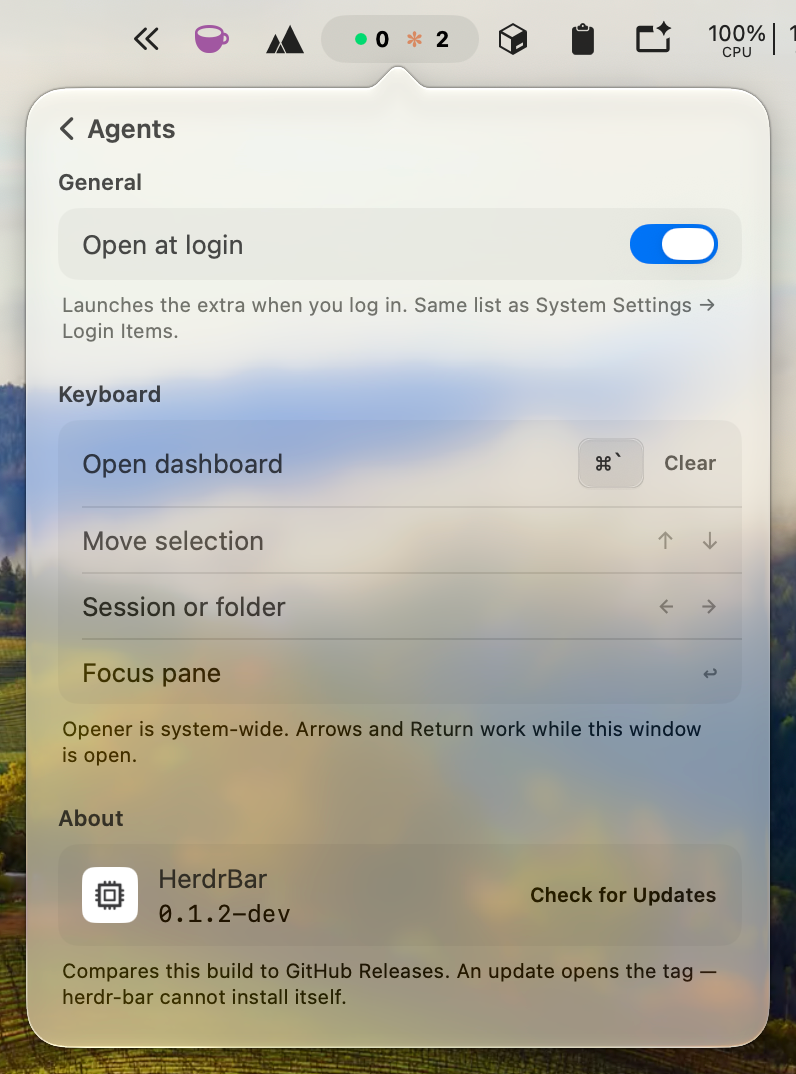
Gear → Keyboard → Open dashboard. Click the well, hold ⌘ / ⌥ / ⌃ plus a key. Carbon RegisterEventHotKey — no Accessibility prompt.
A conflict turns the footer into That shortcut is already taken. Clear unbinds it.
JSON example (⇧⌘Space, kVK_Space = 49):
{
  "hotkey": {
    "keyCode": 49,
    "command": true,
    "shift": true
  }
}
The same group lists in-window shortcuts: ↑↓ walk tasks, ←→ walk sessions / folders, ↩ focuses.
Open at login
Gear → General → Open at login. This is SMAppService.mainApp, the same list as System Settings → General → Login Items — not a herdr-bar.json key. macOS may ask you to approve the item the first time.
A throwaway swift run / dev-run.sh binary cannot register. Pack HerdrBar.app (./scripts/install.sh) first. If the switch stays off after you flip it, the footer will say so, and Open Login Items jumps to the system pane.
Updates
Gear → About. One row: icon + HerdrBar open the source repository; Check for Updates on the right reads CFBundleShortVersionString and compares it to GitHub /repos/openalon-org/herdr-bar/releases/latest. There is no Sparkle install path — an available update opens the release page. Local swift run / unpackaged binaries show dev.