
Usage
Two layers: a menu-bar glance (counts) and a dashboard (jump list). The extra is not a full inventory of every agent.
Menu bar
Menu-bar glance (Done / Working stay put)
| Gesture | Action |
|---|---|
| Left-click | Open the dashboard |
| Option-click | Focus the highest-priority agent |
| Right-click | Refresh with agent.list now |
| Global hotkey | Toggle the dashboard (bound in the gear) |
While online, Done / Working stay on the extra (including zeros). Width hugs the chips; the cluster is centered. Blocked / Unknown or wider digits stretch the extra. The working chip uses Claude Code’s Darwin spinner (·✢✳✶✻✽ ping-pong, 120ms). Blocked / done / unknown breathe a halo when the count is above zero — never a hard blink. The press-highlight capsule is the system’s; at rest the extra does not paint a second one.
Why idle stays off the extra
The menu bar is a glance. Parked agents still exist — open the eye in the dashboard header.
Dashboard
The popover is a fixed 372 × 480. Hiding idle must not shrink the window so it cannot grow back (NSPopover remembers the last height).
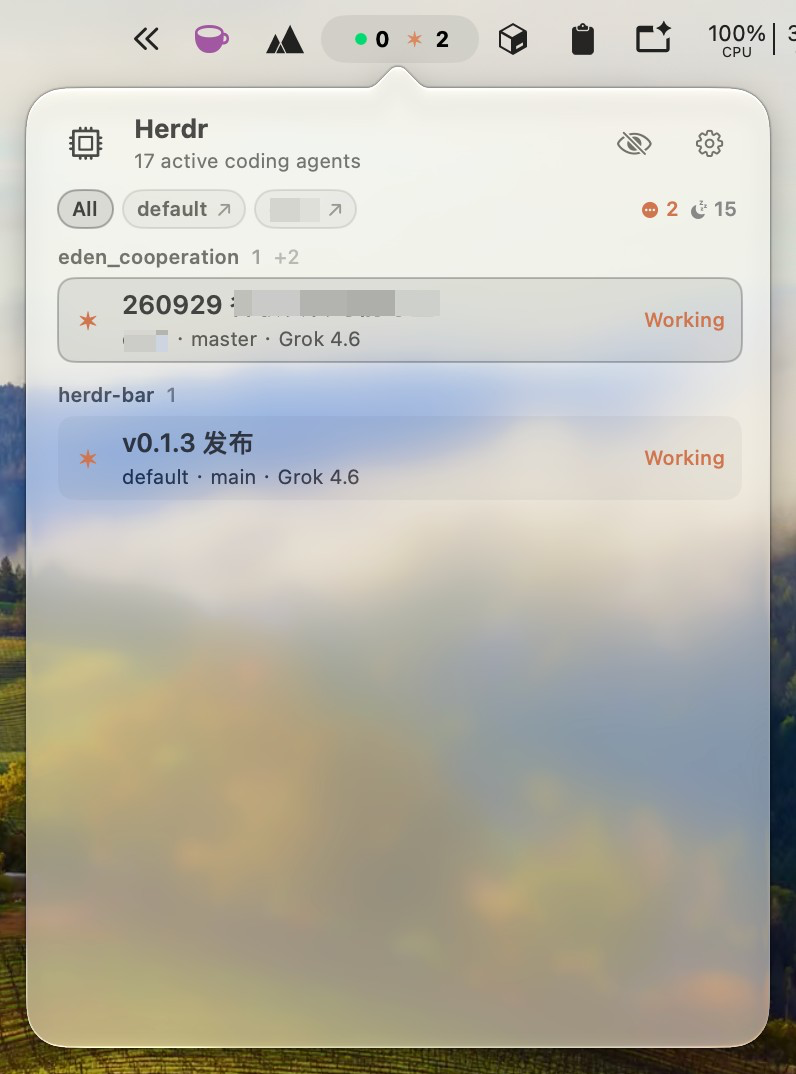
Three layers only — no third chip row:
- Session — scope chips:
All/default/work(only when two or more sessions are online). Chip body filters. Named session chips (not All) keep a trailing arrow that raises that herdr session’s terminal without focusing a pane. - Folder — section headers (last path component of
foreground_cwd/cwd) - Status — row color and priority
Header:
- Mark — quiet hierarchical
cpuSF Symbol. Finder / Login Items / About use the same graycpuon a light tile. - Eye — notification mode. On by default: hide idle rows in mixed groups, drop idle-only groups.
- Gear — General (open at login), keyboard (system-wide opener plus in-window shortcuts), About (one row: icon + name open the source repo; Check for Updates on the right against GitHub Releases), then status colors.
Rows:
- Title from
name/display_agent/terminal_title/agent/pane_id - Subtitle:
session · folder · branch · model - Working rows: Darwin spinner and short model name
- Status sits on the right of the row. No elapsed time, no token count — those live in the CLI footer, not herdr-bar
Click a row = agent.focus that pane, then tab.focus / pane.focus so the attached TUI follows, then raise the host terminal.
Desktop widget
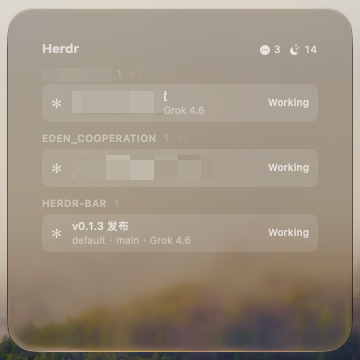
Notification Center → Edit Widgets → Herdr. Medium and Large show the All-scope list under the extra’s current eye.
Keyboard
In-window vs system-wide
The opener is a system-wide Carbon hotkey — no Accessibility prompt. Arrows and Return only work while the dashboard is open.
Focus
A row click (or Return on the highlight) is:
agent.focuson the session that owns the panetab.focus/pane.focusso the attached TUI shows that pane (Herdr 0.9 keeps workspace/tab per client)- Raise the GUI terminal already running that session’s TUI (cmux / Otty / Ghostty / …)
A named session-chip arrow only does step 3 for that session. It does not change the selected pane.
It never:
- Creates a terminal / window / pane / tab / agent
- Activates
herdr server(the process on the listening socket) - Posts another OS notification (Herdr already owns
[ui.toast])
The target is agent.name, or pane_id when the name is empty.